NyumbaniHome / WazaziParents
App ya Wazazi · BureParent App · Free
Matokeo na malipo ya mwanao, kwenye simu yakoYour child’s results and payments, on your phone
Hakuna kusubiri ripoti wala kupiga simu ofisini. Fungua simu, uone matokeo na taarifa za malipo ya mwanao wakati wowote, bure.
No more waiting for reports or calling the office. Open your phone and see your child’s results and payment details any time, free.
 Tafuta Inspire School (Parent): app mpya ina rangi ya kahawa.Search for Inspire School (Parent): the new app is brown.
Hatua kwa HatuaStep by Step
Tazama, kisha fuata: dakika 3 tuWatch, then follow: just 3 minutes
Mwanao anasoma wapi? Chagua, uone maelekezo na video yake.Where does your child study? Choose, and see the guide and video for it.
🏫 MsingiPrimary
Vivid Dream Primary School
Maandalizi na Msingi: Mbuzini, Ole (Pemba) na Tumbatu. Username huanza na 0.Nursery and Primary: Mbuzini, Ole (Pemba) and Tumbatu. The username starts with 0.
InspireInspire School
www.vividdreamschools.ac.tz
School Calendar
School Contacts
 ⬇️Download📄Syllabus
- 🏠Home
- 👤Profile
- 🔔Announcements
- 📝Apply Leave
- 📋My Documents
- 🏢Dormitories
- 🔑Password Change
- ℹ️About School
- 🚪Logout
Inspire SMS. Version 2.0
2026 ▾
Grand Total Summary
ViewShare
1st Instalment School FeePaid
Control No.-
Fees TypeSchool Fees
Total AmountTZS500,000.00
Paid AmountTZS500,000.00
Balance AmountTZS0.00
2nd Instalment School Fee
Control No.-
Total AmountTZS500,000.00
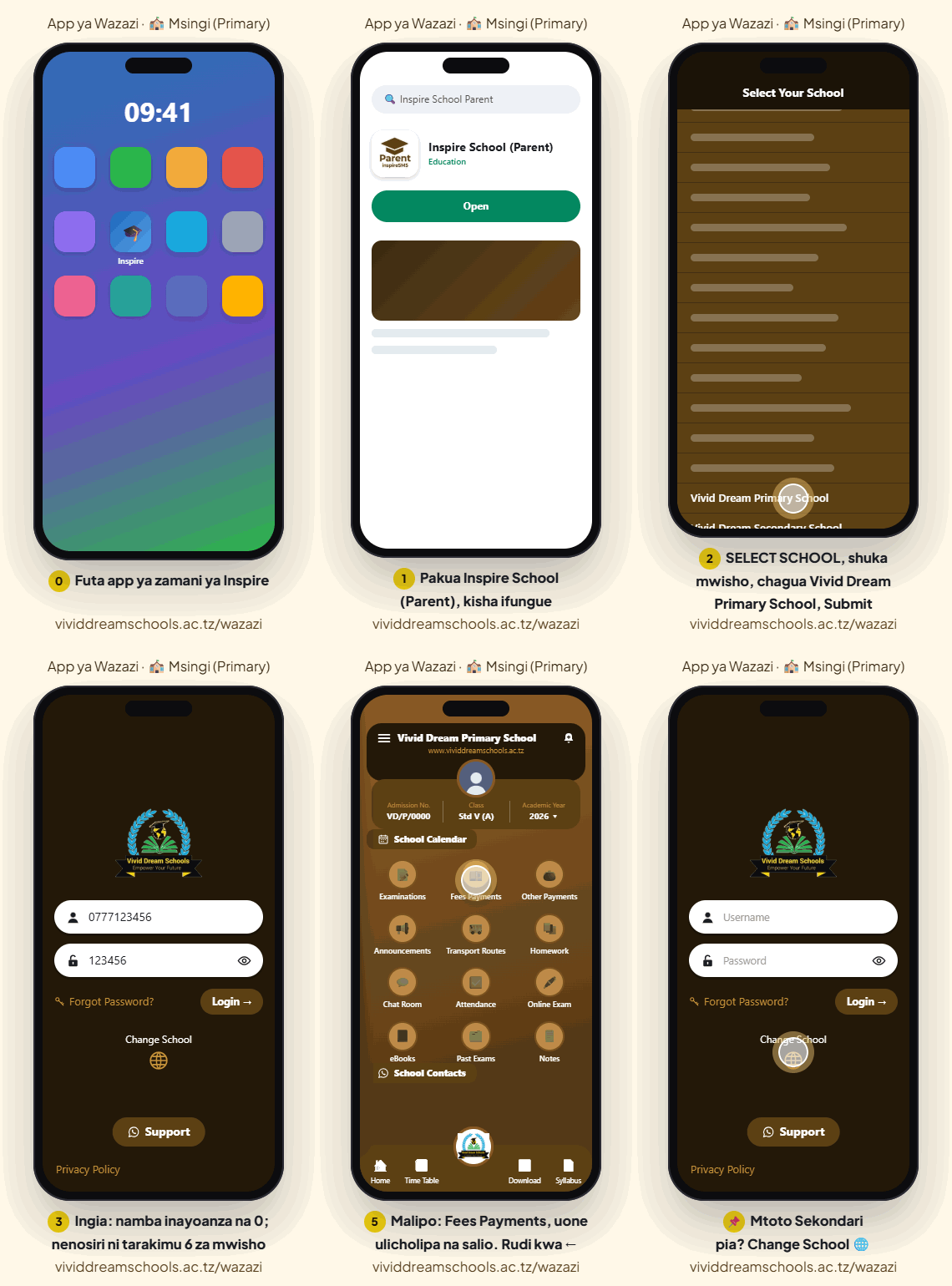
Picha ni mfano: namba, darasa na kiasi ni vya kubuni. Skrini halisi zinaweza kutofautiana kidogo.Illustration: numbers, class and amounts are made up. Real screens may differ slightly.
Kama una app yoyote ya zamani ya Inspire, ifute kwanza: bonyeza na ushikilie alama yake, kisha Ondoa (Uninstall).
If you have any old Inspire app, delete it first: press and hold its icon, then Uninstall.
Google Play kwa Android, App Store kwa iPhone. Bonyeza Install, kisha Open. Baadaye utaifungua kwa alama hii ya kahawa:
Inspire School.Google Play for Android, App Store for iPhone. Tap Install, then Open. Next time, open it from this brown icon:
Inspire School.Bonyeza SELECT SCHOOL, shuka hadi mwisho kabisa wa orodha, chagua Vivid Dream Primary School, kisha bonyeza Submit.
Tap SELECT SCHOOL, scroll to the very end of the list, pick Vivid Dream Primary School, then tap Submit.
Usernamenamba ya simu uliyosajili shuleni, anza na 0, bila nafasithe phone number you registered with the school, starting with 0, no spaces
0777123456Passwordtarakimu 6 za mwisho za namba hiyothe last 6 digits of that number
123456Kisha bonyeza Login. Huna uhakika? Tumia msaidizi →
Then tap Login. Not sure? Use the helper →
Kwenye menyu kuu bonyeza Examinations, tafuta mtihani, kisha Exam Result. Kurudi, bonyeza mshale ← juu kushoto.
On the main menu tap Examinations, find the exam, then Exam Result. To go back, tap the ← arrow at the top left.
Bonyeza Fees Payments: utaona jumla ya ada (Amount), ulicholipa (Paid) na salio (Balance), kwa kila awamu. Kurudi, bonyeza ← juu kushoto.
Tap Fees Payments: you see the total fee (Amount), what you paid (Paid) and what is left (Balance), for each instalment. To go back, tap ← at the top left.
Bonyeza ☰ (mistari mitatu) juu kushoto, kisha Logout. Fanya hivi hasa kama simu inatumiwa na watu wengine.
Tap ☰ (three lines) at the top left, then Logout. Do this especially if others use the phone.
Tumia app hiyo hiyo. Baada ya Logout bonyeza Change School 🌐, chagua Vivid Dream Secondary School, kisha ingia kwa namba inayoanza na +255. Maelekezo ya Sekondari →
Use the same app. After Logout tap Change School 🌐, pick Vivid Dream Secondary School, then log in with the number starting with +255. Secondary guide →
🎓 SekondariSecondary
Vivid Dream Secondary School
Sekondari na High School: Kinduni. Username huanza na +255.Secondary and High School: Kinduni. The username starts with +255.
InspireInspire Schoolwww.vividdreamschools.ac.tz
School Calendar
School Contacts
⬇️Download📄Syllabus- 🏠Home
- 👤Profile
- 🔔Announcements
- 📝Apply Leave
- 📋My Documents
- 🏢Dormitories
- 🔑Password Change
- ℹ️About School
- 🚪Logout
Inspire SMS. Version 2.0
2026 ▾
Grand Total Summary
ViewShare
1st Instalment School FeePaid
Control No.-
Fees TypeSchool Fees
Total AmountTZS500,000.00
Paid AmountTZS500,000.00
Balance AmountTZS0.00
2nd Instalment School Fee
Control No.-
Total AmountTZS500,000.00
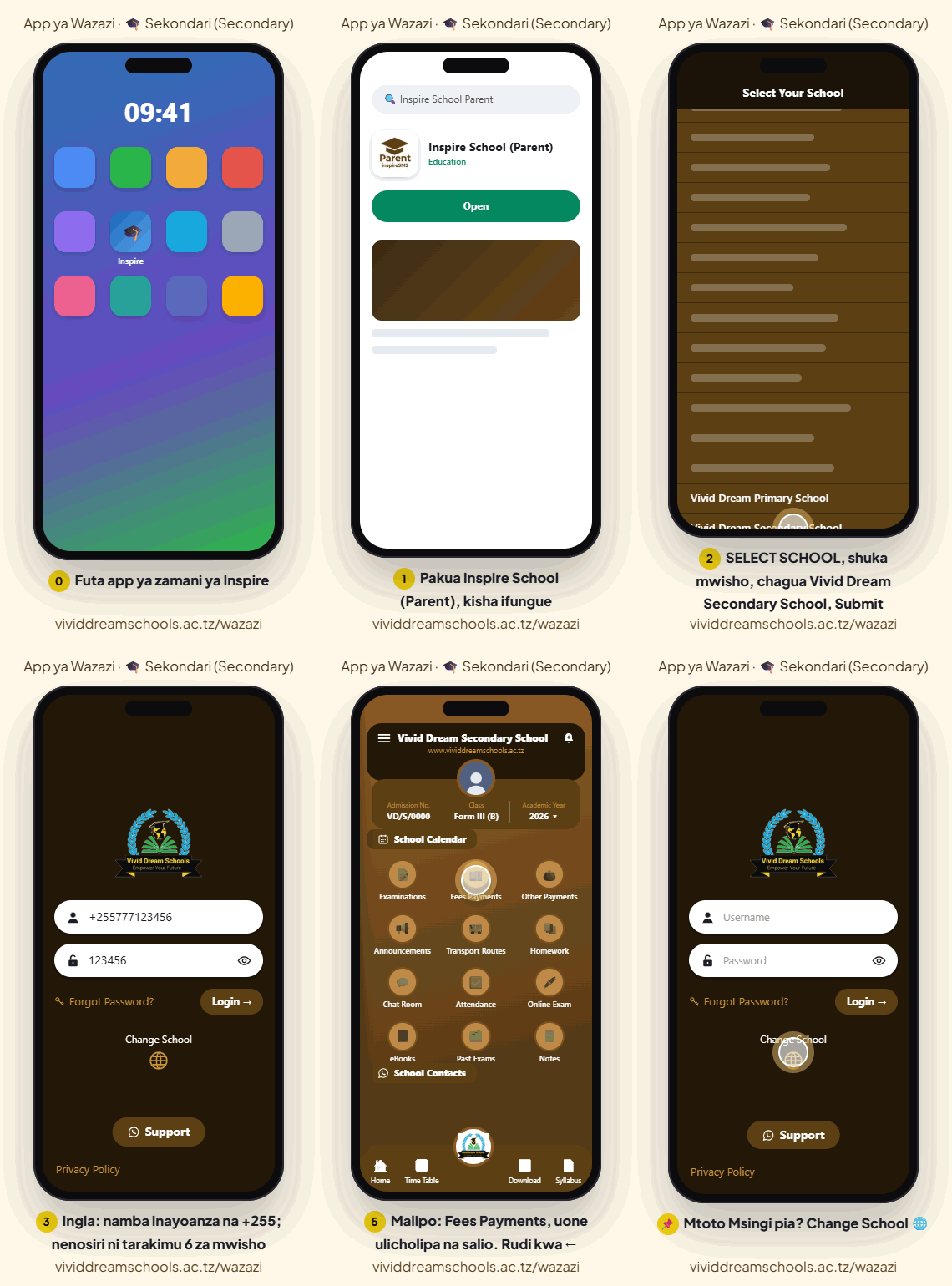
Picha ni mfano: namba, darasa na kiasi ni vya kubuni. Skrini halisi zinaweza kutofautiana kidogo.Illustration: numbers, class and amounts are made up. Real screens may differ slightly.
Kama una app yoyote ya zamani ya Inspire, ifute kwanza: bonyeza na ushikilie alama yake, kisha Ondoa (Uninstall).
If you have any old Inspire app, delete it first: press and hold its icon, then Uninstall.
Google Play kwa Android, App Store kwa iPhone. Bonyeza Install, kisha Open. Baadaye utaifungua kwa alama hii ya kahawa:
Inspire School.Google Play for Android, App Store for iPhone. Tap Install, then Open. Next time, open it from this brown icon:
Inspire School.Bonyeza SELECT SCHOOL, shuka hadi mwisho kabisa wa orodha, chagua Vivid Dream Secondary School, kisha bonyeza Submit.
Tap SELECT SCHOOL, scroll to the very end of the list, pick Vivid Dream Secondary School, then tap Submit.
Usernamenamba ya simu uliyosajili shuleni, anza na +255, bila nafasithe phone number you registered with the school, starting with +255, no spaces
+255777123456Passwordtarakimu 6 za mwisho za namba hiyothe last 6 digits of that number
123456Kisha bonyeza Login. Huna uhakika? Tumia msaidizi →
Then tap Login. Not sure? Use the helper →
Kwenye menyu kuu bonyeza Examinations, tafuta mtihani, kisha Exam Result. Kurudi, bonyeza mshale ← juu kushoto.
On the main menu tap Examinations, find the exam, then Exam Result. To go back, tap the ← arrow at the top left.
Bonyeza Fees Payments: utaona jumla ya ada (Amount), ulicholipa (Paid) na salio (Balance), kwa kila awamu. Kurudi, bonyeza ← juu kushoto.
Tap Fees Payments: you see the total fee (Amount), what you paid (Paid) and what is left (Balance), for each instalment. To go back, tap ← at the top left.
Bonyeza ☰ (mistari mitatu) juu kushoto, kisha Logout. Fanya hivi hasa kama simu inatumiwa na watu wengine.
Tap ☰ (three lines) at the top left, then Logout. Do this especially if others use the phone.
Tumia app hiyo hiyo. Baada ya Logout bonyeza Change School 🌐, chagua Vivid Dream Primary School, kisha ingia kwa namba inayoanza na 0. Maelekezo ya Msingi →
Use the same app. After Logout tap Change School 🌐, pick Vivid Dream Primary School, then log in with the number starting with 0. Primary guide →
Msaidizi wa KuingiaLogin Helper
Andika namba yako, tukuonyeshe cha kuandikaType your number, we show you what to enter
Namba yako haitumwi popote: inabaki kwenye simu yako tu.Your number is not sent anywhere: it stays on your phone.
IkikwamaIf You Get Stuck
Maswali ya wazaziParents’ questions
Imekataa kuingia (Login failed)Login failed
Hakikisha: (1) umechagua shule sahihi, Primary au Secondary; (2) Primary unaanza na 0, Secondary unaanza na +255, bila nafasi; (3) nenosiri ni tarakimu 6 za mwisho za namba hiyo hiyo. Ikiendelea kukataa, huenda namba yako shuleni ni tofauti: wasiliana na ofisi.
Check that: (1) you picked the right school, Primary or Secondary; (2) Primary starts with 0 and Secondary with +255, with no spaces; (3) the password is the last 6 digits of that same number. If it still fails, the school may hold a different number for you: contact the office.
Sioni shule yetu kwenye orodhaI can’t find our school in the list
Shuka hadi mwisho kabisa wa orodha: Vivid Dream Primary School na Vivid Dream Secondary School ziko chini kabisa. Hakikisha pia umepakua app sahihi, Inspire School (Parent) yenye rangi ya kahawa.
Scroll to the very end of the list: Vivid Dream Primary School and Vivid Dream Secondary School are at the bottom. Also make sure you downloaded the right app, the brown Inspire School (Parent).
Nimebadilisha namba ya simuI changed my phone number
Wasiliana na ofisi ya shule ili namba mpya isajiliwe, kisha ingia kwa namba hiyo mpya.
Contact the school office to register the new number, then log in with it.
Bado nina app ya zamani ya InspireI still have the old Inspire app
Ifute kwanza (hatua 0), kisha pakua app mpya. App mbili zenye majina yanayofanana huchanganya wakati wa kuingia.
Delete it first (step 0), then download the new app. Two apps with similar names cause confusion when logging in.
Je, app ni bure?Is the app free?
Ndiyo, ni bure kupakua na kutumia. Unahitaji tu intaneti kidogo.
Yes, it is free to download and use. You only need a little internet data.
Sina simu janja (smartphone)I don’t have a smartphone
Unaweza kuingia kupitia kompyuta au simu yoyote yenye kivinjari: Portal ya Wazazi (Msingi) au Portal ya Wazazi (Sekondari), kwa jina la mtumiaji na nenosiri lile lile.
You can log in from a computer or any phone with a browser: Parent Portal (Primary) or Parent Portal (Secondary), with the same username and password.
MsaadaHelp
Tuandikie WhatsAppMessage us on WhatsApp
Muda wa kazi. Tuambie shule (Primary au Secondary) na tatizo lako.Working hours. Tell us the school (Primary or Secondary) and your problem.
Ofisi: 0689 220 990Office: 0689 220 990 Msaada wa kiufundi: 0715 300 921Technical help: 0715 300 921